
Be it reaching new audiences, connecting with social media influencers or promoting a new product or service, Instagram is the best platform to use. To get the most out of Instagram marketing strategies, it is important to know all about Instagram analytics and posting processes.
Most marketers simply create a brand profile and post randomly on the platform hoping to reach a relevant audience base. This might not work anymore because the platform has introduced several new features that can have an impact on your overall Instagram metrics. Right from the time to post to choosing the right target audience for promoting your post, everything has an impact on your Instagram post analytics. Also, the competition on the platform further increases the challenges.
While most of us are only concerned about Instagram analytics, one must also know about the basics of the platform and that is how to post on Instagram. As we all know, Instagram now supports a lot of video content in the form of Reels and Stories. And one must be aware of the posting processes thoroughly to use the platform optimally.
In this blog, we will give you a complete overview of how to post different types of content on Instagram. Not just that, we will also help you understand the Instagram insights for each of these content formats with the help of Unbox Social.
How To Post On Instagram?

Instagram can be rightly termed as a user-friendly platform and hence, the posting process does not need a lot of thinking. Let’s begin with the process of uploading a post on Instagram.
Steps To Post On Instagram
Step 1- Tap on the + sign on your screen
Step 2- Choose the content type you want to post. The options are divided into four categories namely- Post, Story, Reel, Live
Step 3- Choose Post
Step 4- Choose the image from your gallery or other saved files
Step 5- Choose the filters you want for your image to enhance its aesthetics
Step 6- Add a caption of your choice, tag people on the post if you wish to, add location details or add music
Step 7- Choose other platforms you want to post on simultaneously
Step 8- Voila! Your post is ready for upload
Steps To Upload a Story On Instagram
Step 1- Tap on the + sign on your screen
Step 2- Choose the content type you want to post. The options are divided into four categories namely- Post, Story, Reel, Live
Step 3- Choose Story
Step 4- Now you can choose from the already saved files on your phone or click a picture from the Instagram camera. The feature also allows you to upload videos as stories
Step 5- Tap on the circle to click a picture or hold the circle to shoot a video
Step 6- Click on the editing options to enhance your story. The feature allows you to add text, GIFs, location, music, link, and effect.
Step 7- Once your story is good to go click on ‘Your Story’ to upload the same
Steps to Upload a Reel On Instagram
The popularity of Reels has changed the face of Instagram marketing. Brands are witnessing a new jump in their video marketing campaigns because of Reels. Reels are short 60-second videos that are basically created to set or follow a trend on the platform. This feature is quite crucial for brands and businesses that collaborate with influencers and want to focus on video marketing. Reels can help improve your Instagram stats too. Here are the steps to upload a Reel on Instagram.
Step 1- Tap on the + sign on your screen
Step 2- Choose the content type you want to post. The options are divided into four categories namely- Post, Story, Reel, Live
Step 3- Choose Reel
Step 4- Once you choose Reel, you will see a range of options.
Step 5- Use the tools given to set the overall setting of your Reel. Add music, change the speed of your video, set the timer for your video and click and hold on the circle to start recording your video.
Step 6- Click on the circle again to end the recording
Step 7- Once the recording is done you can add text and stickers to the Reel too
Step 8- Add the cover to your Reel and caption. Click on Share to Feed if you want and click on Share or save it in your drafts. You’re Done!
Well, now that we have explained to you the process of posting on Instagram, let’s move on to the most crucial aspect of Instagram marketing and that is Instagram analytics.
Instagram Analytics With Unbox Social For Posts And Stories
-
Instagram Post Analytics
Instagram post insights are crucial for every brand marketer. The insights on Instagram’s native analytics dashboard are quite basic but if you want a detailed evaluation of your posts’ performance, then it is best to rely on an Instagram analytics tool like Unbox Social.
Let’s find out how Unbox Social helps with Instagram post insights.
1. Get post insights on engagement and post data
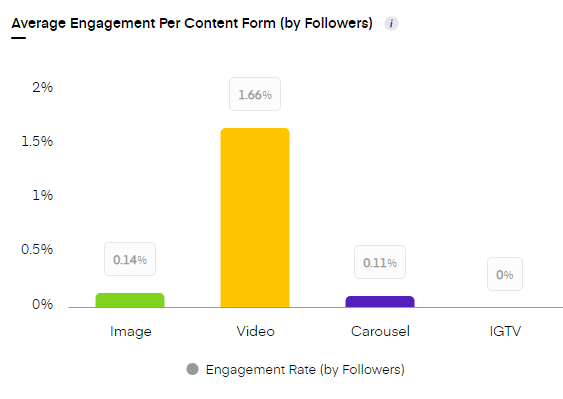
Instagram analytics is not just about likes and comments, it is necessary to check the engagement rate by content form and followers too. The Unbox Social tool gives you an engagement rate as per content formats and followers. This helps you figure out what content format is fetching you the highest engagement by reach and followers.
2. Get Instagram insights on the best time to post
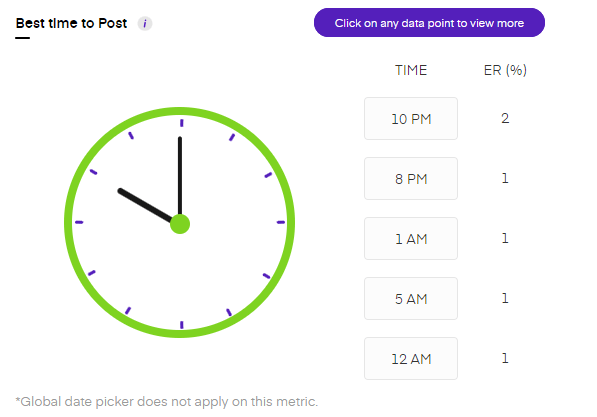
Apart from framing a post, it is also necessary to time it well. Scheduling Instagram posts at the right time can improve your Instagram metrics. The tool gives you data on the best time to post which will help you structure your posting schedule.
3. Know when your followers are online
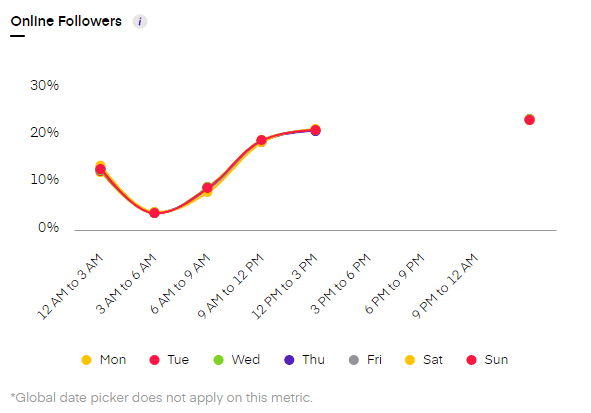
Keeping a track of your active followers is crucial to the success of your Instagram marketing strategy. The tool gives you accurate data on when your followers are active on the platform. The data helps you come up with a result-oriented posting schedule.
4. Know all about your profile views and clicks
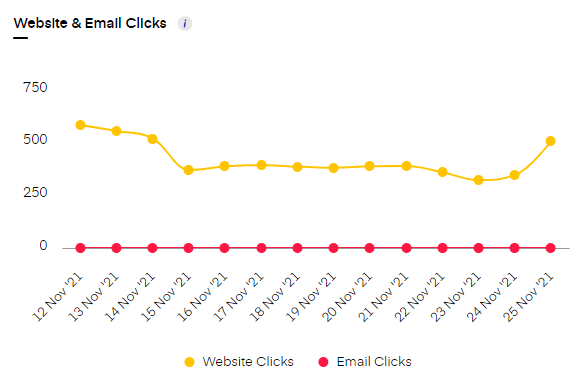
The audience engagement can also be analyzed with the help of clicks and views. With the help of the Unbox Social tool, you can check the number of clicks received on your website link and email button. Additionally, the tool also gives you an account of the total profile views. These Instagram insights will help you observe audience behavior on your profile.
5. Get Instagram hashtag analytics
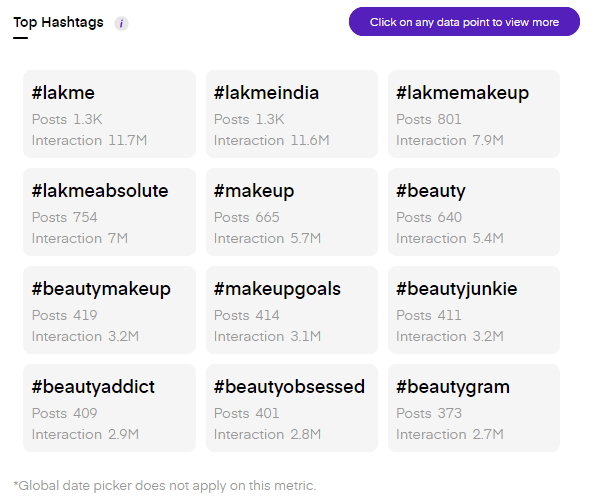
Analytics on Instagram’s native dashboard is quite restricted. The Unbox Social tool gives you data on Instagram hashtag analytics. The metric tells you about the most used hashtags that garnered the highest interaction for your posts. This data will help you choose the right hashtags for your posts.
6. Get detailed Instagram analytics for every post
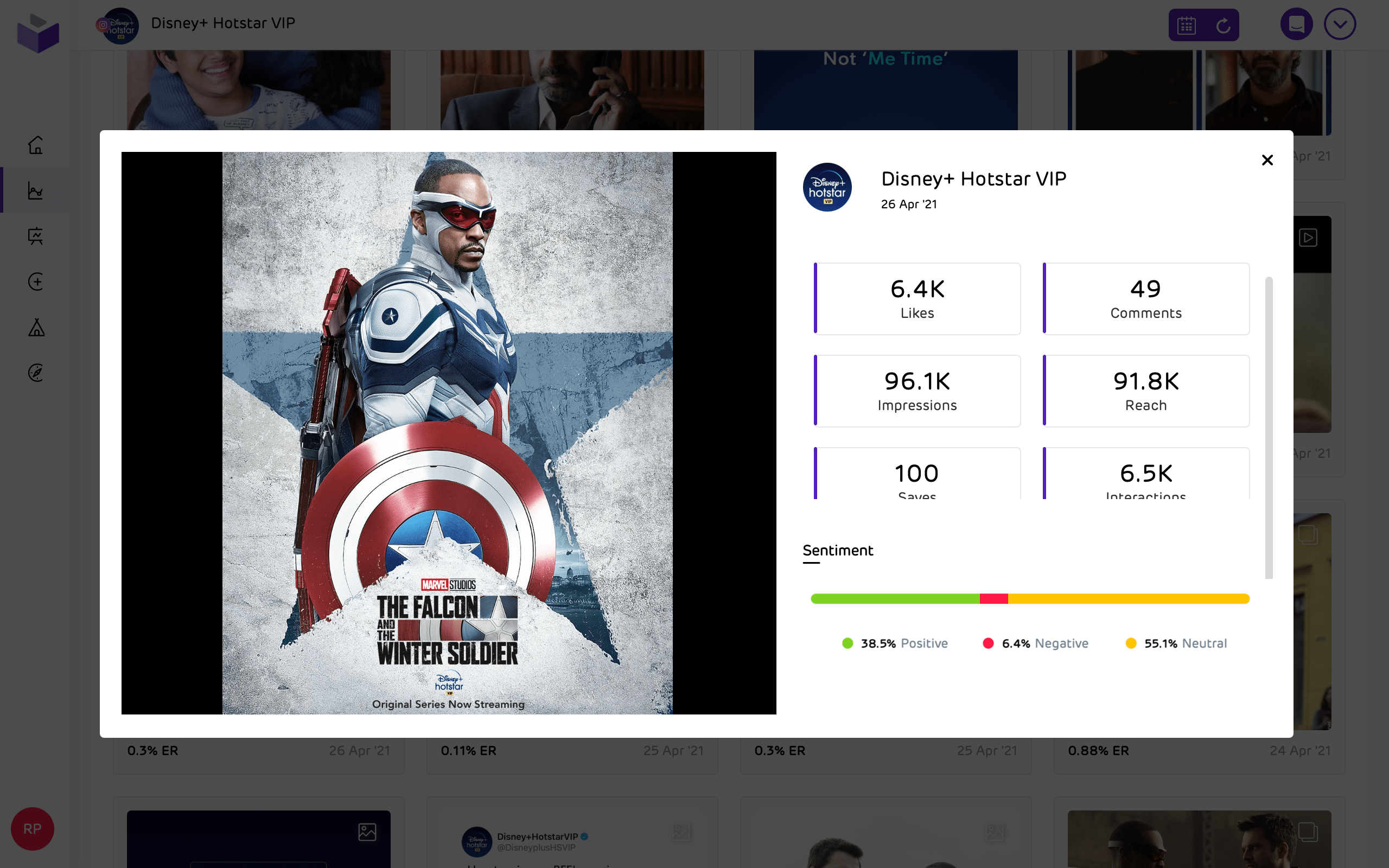
The tool gives you Instagram metrics for every post on your profile. The metrics are also available for video posts on your profile. For image posts, marketers can get data on likes, comments, saves, impressions, reach, engagement, and audience sentiment. For videos, the tool gives you data on all the above-mentioned metrics including total video views.
The tool will provide you with these insights in its Instagram analytics reports too. The reports will help you analyze your content strategy better!
-
Instagram Analytics for Stories
Instagram’s Story feature has helped several brands scale up their audience engagement bar. This content format is apt for brands that want to constantly keep their audience engaged with new updates and developments. Let’s look at how Unbox Social helps with Instagram analytics for Stories.
1. Get Stories data for all your uploads
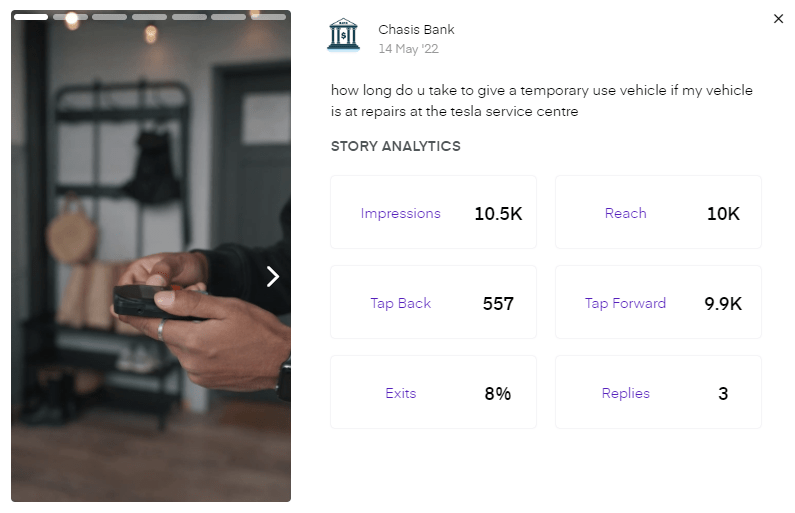
The Unbox Social tool gives you data for all the stories you upload. The tool gives you detailed data on both image and video stories. The metrics include impressions, reach, tap back, tap forward, exits, and replies.
2. Get performance data on your stories by content format
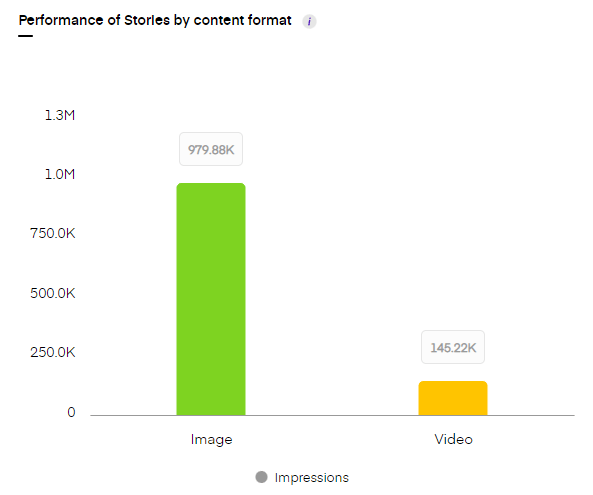
The tool gives data on impressions received on your stories bifurcated by images and videos. The impressions data will tell you what kind of stories work better for your profile.
3. Get total reach metrics for your Instagram stories
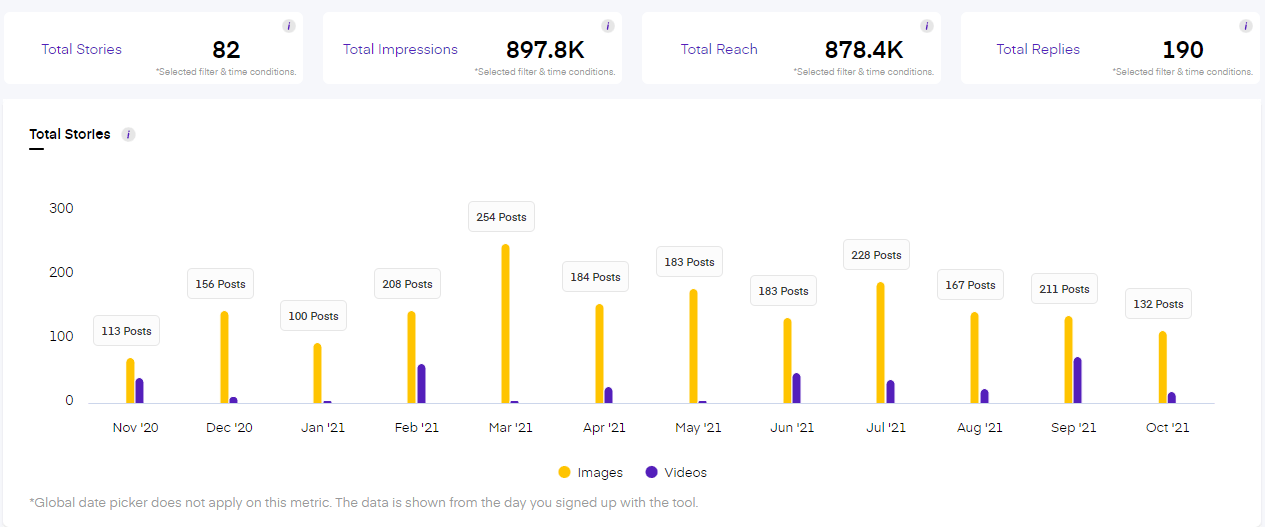
The tool gives you a complete account of how your overall stories are performing on the platform. The Instagram analytics for stories include total stories, total impressions, total reach, and total replies.
The Unbox Social tool is one of the best Instagram analytics tools to analyze and measure your Instagram performance. Apart from post and story analytics data, the tool also offers in-depth Instagram audience insights and Instagram follower analytics.
-
Instagram Audience Insights– Unbox Social
Every brand’s primary goal is to reach a relevant audience base. To do so, it is first necessary to understand the audience following your brand on the platform. Unbox Social offers detailed Instagram audience insights that help you frame effective strategies for your brand. Here is how the tool gives you Instagram follower insights.
1. Get in-depth audience demographics
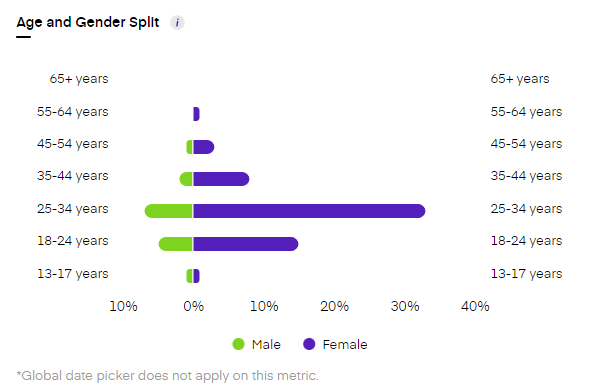
The tool gives Instagram insights into your audience demographics. Get data on audience age, gender, and location. The stated data will tell you who your audience base comprises of. This data helps marketers frame result-oriented strategies.
2. Know audience interest and audience sentiment

The Instagram reports from Unbox Social give you insights into audience interest and audience sentiment too. Know what your audience is interested in so that you can focus your posts on those themes and topics. The audience sentiment will help you detect whether the sentiment for your profile is positive, negative or neutral. The tool also gives you data on sentiment analysis by emoji!
3. Know your followers’ mode of interaction
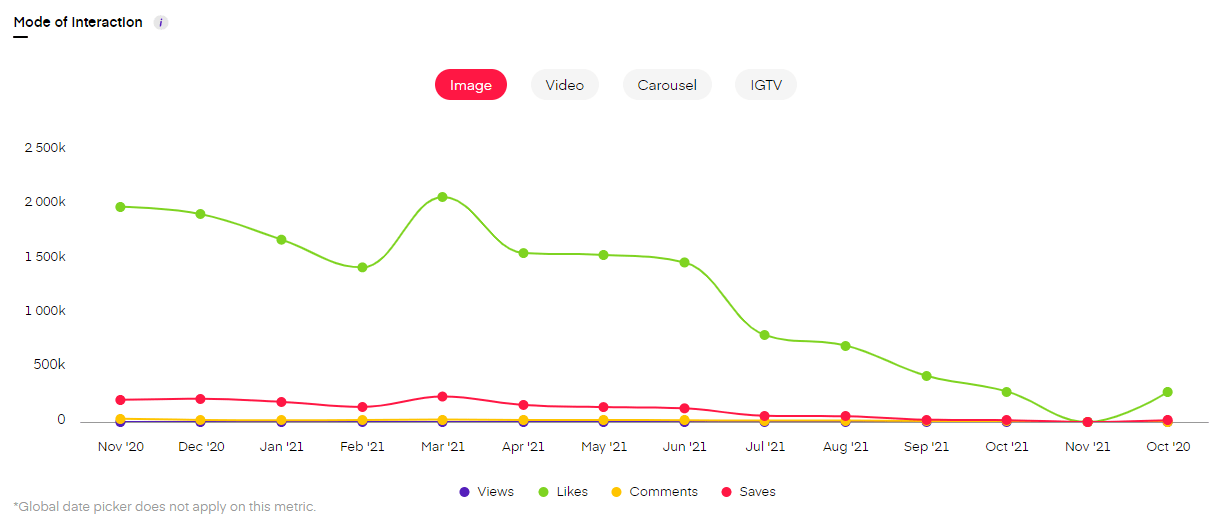
It is important to know how the audience is interacting with your content (Likes, Comments, Views, Shares) for each content format (Image, Video, Carousel, IGTV).
It can be rightly said that the Instagram analytics report from Unbox Social will assist you in getting the most out of the platform. The detailed Instagram insights are all you need to know what is working for your brand and what is not.
Make sure you focus on every metric to know where your brand stands on the platform. Additionally, the Unbox Social tool also offers a competition tracking feature that allows you to measure your brand’s performance against that of your competitors. Take the Unbox Social free trial NOW!